Naver AI Overview API
The Naver AI Overview API allows you to scrape the contents of the "AI Briefing" section in Naver search results, if they are not already included in the AI Briefing Results of a regular web search.
The API endpoint is https://serpapi.com/search?engine=naver_ai_overview
Head to the playground for a live and interactive demo.
New Naver AI Mode API
You can now use the Naver AI Mode API to fetch results from the Naver AI Mode Tab.
API parameters
Advanced filters
page_token
Optional
Parameter defines the token needed to retrieve the business AI Briefing. Use ai_briefing.page_token from our Naver Search API.
page_token and query parameters can't be used together.
 SerpApi parameters
device
Optional
Parameter defines the device to use to get the results. It can be set to desktop (default) to use a regular browser, tablet to use a tablet browser (currently using iPads), or mobile to use a mobile browser.
no_cache
Optional
Parameter will force SerpApi to fetch the Naver AI Overview results even if a cached version is already present. A cache is served only if the query and all parameters are exactly the same. Cache expires after 1h. Cached searches are free, and are not counted towards your searches per month. It can be set to false (default) to allow results from the cache, or true to disallow results from the cache. no_cache and async parameters should not be used together.
async
Optional
Parameter defines the way you want to submit your search to SerpApi. It can be set to false (default) to open an HTTP connection and keep it open until you got your search results, or true to just submit your search to SerpApi and retrieve them later. In this case, you'll need to use our Searches Archive API to retrieve your results. async and no_cache parameters should not be used together. async should not be used on accounts with Ludicrous Speed enabled.
zero_trace
Optional
Enterprise only. Parameter enables ZeroTrace mode. It can be set to false (default) or true. Enable this mode to skip storing search parameters, search files, and search metadata on our servers. This may make debugging more difficult.
output
Optional
Parameter defines the format of the result. It can be set to json (default) to get a structured JSON of the results, html to get the raw HTML retrieved, or md to get a Markdown-formatted version optimized for LLMs and AI agents.
json_restrictor
Optional
Parameter defines the fields you want to include in the output, reducing payload size for faster response. See the JSON Restrictor documentation for more details.
API results
JSON results
JSON output includes structured data for text_blocks, media and references.
A search status is accessible through search_metadata.status.
It flows this way: Processing -> Success || Error.
If a search has failed, error will contain an error message.
search_metadata.id is the search ID inside SerpApi.
HTML results
HTML output is useful to debug JSON results or support features not yet supported by SerpApi. It gives you the raw HTML results from Naver AI Overview.
Markdown results
Markdown output is optimized for LLMs and AI agents. It provides a curated view of the JSON results
in a token-efficient format using tables, markdown links, and YAML frontmatter.
To access, use the output=md parameter, the /search.md endpoint, or request header Accept: text/markdown.
API examples
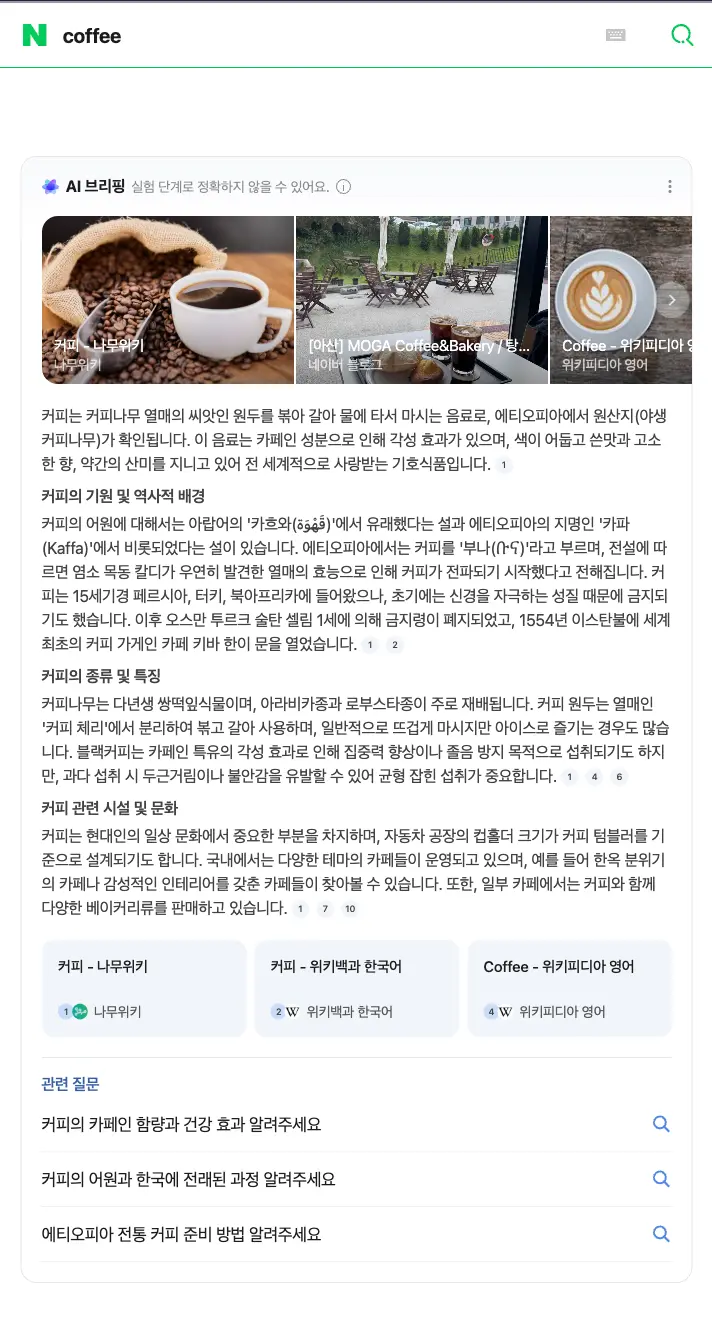
Naver AI Briefing for query: coffee
{
  "search_metadata": {
    "id": "6a9874ad413ef3bed0c703d0",
    "status": "Success",
    "json_endpoint": "https://serpapi.com/searches/HTkUnsBhnxsyWE7EYDfxuGWKrHtPWDRnLm3LQufrHb0/6a9874ad413ef3bed0c703d0.json",
    "markdown_endpoint": "https://serpapi.com/searches/HTkUnsBhnxsyWE7EYDfxuGWKrHtPWDRnLm3LQufrHb0/6a9874ad413ef3bed0c703d0.md",
    "created_at": "2026-09-02 19:10:37 UTC",
    "processed_at": "2026-09-02 19:10:37 UTC",
    "naver_ai_overview_url": "https://aib-api.naver.com/aibrender.naver?query=coffee&where=nexearch",
    "raw_html_file": "https://serpapi.com/searches/HTkUnsBhnxsyWE7EYDfxuGWKrHtPWDRnLm3LQufrHb0/6a9874ad413ef3bed0c703d0.html",
    "prettify_html_file": "https://serpapi.com/searches/HTkUnsBhnxsyWE7EYDfxuGWKrHtPWDRnLm3LQufrHb0/6a9874ad413ef3bed0c703d0.prettify",
    "total_time_taken": 4.69
  },
  "search_parameters": {
    "engine": "naver_ai_overview",
    "query": "coffee"
  },
  "markdown": "커피는 커피나무 열매의 씨앗인 원두를 볶아 갈아 물에 타서 마시는 음료로, 에티오피아에서 원산지(야생 커피나무)가 확인됩니다.[1] 이 음료는 카페인 성분으로 인해 각성 효과가 있으며, 색이 어둡고 쓴맛과 고소한 향, 약간의 산미를 지니고 있어 전 세계적으로 사랑받는 기호식품입니다.[1]\n\n### 커피의 기원 및 역사적 배경\n커피의 어원에 대해서는 아랍어의 '카흐와(قَهْوَة)'에서 유래했다는 설과 에티오피아의 지명인 '카파(Kaffa)'에서 비롯되었다는 설이 있습니다.[1] 에티오피아에서는 커피를 '부나(ቡና)'라고 부르며[1], 전설에 따르면 염소 목동 칼디가 우연히 발견한 열매의 효능으로 인해 커피가 전파되기 시작했다고 전해집니다.[2] 커피는 15세기경 페르시아, 터키, 북아프리카에 들어왔으나, 초기에는 신경을 자극하는 성질 때문에 금지되기도 했습니다.[2] 이후 오스만 투르크 술탄 셀림 1세에 의해 금지령이 폐지되었고, 1554년 이스탄불에 세계 최초의 커피 가게인 카페 키바 한이 문을 열었습니다.[2]\n\n### 커피의 종류 및 특징\n커피나무는 다년생 쌍떡잎식물이며, 아라비카종과 로부스타종이 주로 재배됩니다.[1] 커피 원두는 열매인 '커피 체리'에서 분리하여 볶고 갈아 사용하며, 일반적으로 뜨겁게 마시지만 아이스로 즐기는 경우도 많습니다.[1] [4] 블랙커피는 카페인 특유의 각성 효과로 인해 집중력 향상이나 졸음 방지 목적으로 섭취되기도 하지만, 과다 섭취 시 두근거림이나 불안감을 유발할 수 있어 균형 잡힌 섭취가 중요합니다.[6]\n\n### 커피 관련 시설 및 문화\n커피는 현대인의 일상 문화에서 중요한 부분을 차지하며, 자동차 공장의 컵홀더 크기가 커피 텀블러를 기준으로 설계되기도 합니다.[1] 국내에서는 다양한 테마의 카페들이 운영되고 있으며, 예를 들어 한옥 분위기의 카페나 감성적인 인테리어를 갖춘 카페들이 찾아볼 수 있습니다.[7] [10] 또한, 일부 카페에서는 커피와 함께 다양한 베이커리류를 판매하고 있습니다.[10]",
  "text_blocks": [
    {
      "type": "paragraph",
      "snippet": "커피는 커피나무 열매의 씨앗인 원두를 볶아 갈아 물에 타서 마시는 음료로, 에티오피아에서 원산지(야생 커피나무)가 확인됩니다. 이 음료는 카페인 성분으로 인해 각성 효과가 있으며, 색이 어둡고 쓴맛과 고소한 향, 약간의 산미를 지니고 있어 전 세계적으로 사랑받는 기호식품입니다.",
      "reference_indexes": [
        1
      ]
    },
    {
      "type": "header",
      "level": 3,
      "snippet": "커피의 기원 및 역사적 배경"
    },
    {
      "type": "paragraph",
      "snippet": "커피의 어원에 대해서는 아랍어의 '카흐와(قَهْوَة)'에서 유래했다는 설과 에티오피아의 지명인 '카파(Kaffa)'에서 비롯되었다는 설이 있습니다. 에티오피아에서는 커피를 '부나(ቡና)'라고 부르며, 전설에 따르면 염소 목동 칼디가 우연히 발견한 열매의 효능으로 인해 커피가 전파되기 시작했다고 전해집니다. 커피는 15세기경 페르시아, 터키, 북아프리카에 들어왔으나, 초기에는 신경을 자극하는 성질 때문에 금지되기도 했습니다. 이후 오스만 투르크 술탄 셀림 1세에 의해 금지령이 폐지되었고, 1554년 이스탄불에 세계 최초의 커피 가게인 카페 키바 한이 문을 열었습니다.",
      "reference_indexes": [
        1,
        2
      ]
    },
    {
      "type": "header",
      "level": 3,
      "snippet": "커피의 종류 및 특징"
    },
    {
      "type": "paragraph",
      "snippet": "커피나무는 다년생 쌍떡잎식물이며, 아라비카종과 로부스타종이 주로 재배됩니다. 커피 원두는 열매인 '커피 체리'에서 분리하여 볶고 갈아 사용하며, 일반적으로 뜨겁게 마시지만 아이스로 즐기는 경우도 많습니다.  블랙커피는 카페인 특유의 각성 효과로 인해 집중력 향상이나 졸음 방지 목적으로 섭취되기도 하지만, 과다 섭취 시 두근거림이나 불안감을 유발할 수 있어 균형 잡힌 섭취가 중요합니다.",
      "reference_indexes": [
        1,
        4,
        6
      ]
    },
    {
      "type": "header",
      "level": 3,
      "snippet": "커피 관련 시설 및 문화"
    },
    {
      "type": "paragraph",
      "snippet": "커피는 현대인의 일상 문화에서 중요한 부분을 차지하며, 자동차 공장의 컵홀더 크기가 커피 텀블러를 기준으로 설계되기도 합니다. 국내에서는 다양한 테마의 카페들이 운영되고 있으며, 예를 들어 한옥 분위기의 카페나 감성적인 인테리어를 갖춘 카페들이 찾아볼 수 있습니다.  또한, 일부 카페에서는 커피와 함께 다양한 베이커리류를 판매하고 있습니다.",
      "reference_indexes": [
        1,
        7,
        10
      ]
    }
  ],
  "references": [
    {
      "index": 1,
      "title": "커피 - 나무위키",
      "snippet": "개요 Coffee 커피나무 열매의 씨앗(원두)을 볶아 향을 내고 , 딱딱한 씨앗의 성분이 물에 잘 우러나오도록 갈은 뒤, 물에 타서 마시는 음료다. 야생 커피나무의 원산지는 에티오",
      "link": "https://namu.wiki/w/%EC%BB%A4%ED%94%BC",
      "source": "나무위키",
      "source_icon": "https://namu.wiki/favicon.ico"
    },
    {
      "index": 2,
      "title": "커피 - 위키백과 한국어",
      "snippet": "아랍어의 까후와는 ‘배고픔을 줄이다’라는 의미의 ‘까히야’의 변화형으로, 원래 와인의 한 종류를 가리키는 말이었으나, 와인과 유사한 각성효과가 있는 커피에도 붙여졌다고 한다. 아랍",
      "link": "https://ko.wikipedia.org/wiki/%EC%BB%A4%ED%94%BC",
      "source": "위키백과 한국어",
      "source_icon": "https://ko.wikipedia.org/favicon.ico"
    },
    {
      "index": 4,
      "title": "Coffee - 위키피디아 영어",
      "snippet": "For other uses, see Coffee (disambiguation). Coffee Latte and black filtered coffee Type Usually hot",
      "link": "https://en.wikipedia.org/wiki/Coffee",
      "source": "위키피디아 영어",
      "source_icon": "https://en.wikipedia.org/favicon.ico"
    },
    {
      "index": 6,
      "title": "블랙커피 원두커피 효능 핵심 사항",
      "snippet": "블랙커피 원두커피 효능 핵심 사항, 어떻게 마시느냐도 중요합니다 하루를 시작하면서 블랙커피 한 잔을 찾는 사람들이 많다. 특히 설탕과 프림 없이 마시는 원두커피는 비교적 깔끔한 느",
      "link": "https://blog.naver.com/cera23/224299295540",
      "source": "네이버 블로그",
      "source_icon": "https://blogpfthumb-phinf.pstatic.net/MjAyMjAyMDFfNzUg/MDAxNjQzNzE0MTQ0MTcy.gp4D3kU6NkheBtcGA6mo1m74E8VQJQ5Tte4c6EyhMD4g.rHPYq402VIDekPwljZJZkZX0M1w8VjQ0Ue-BCR04_Rwg.PNG.cera23/profileImage.png",
      "date": "2026-05-28T19:14:00+09:00"
    },
    {
      "index": 7,
      "title": "여수감성카페, 여수신상카페,여천신상카페, 여수현지인맛집, 여수카페추천 “언던커피“,”여수언던커피“,“un....",
      "snippet": "안녕하세요!☺️ 오늘 소개해드릴 곳은 여수 신기동(흥국상가)에 위치한 카페 언던커피입니다. (UNDONE COFFEE) 평소에 제가 감성카페, 예쁜 카페, 느좋카페 등을 좋아해서 ",
      "link": "https://blog.naver.com/hayoung7998/224379630354",
      "source": "네이버 블로그",
      "source_icon": "https://blogpfthumb-phinf.pstatic.net/MjAyNjA3MTVfMjAg/MDAxNzg0MTI2NjQ2ODU2.CUK6_flNjbhlSn9S-5F-buz11eq8TlGJ7D-Eq92aWzsg.EneT9SiajbSsov1vwIBusnPlTFd4BwBK2lmF9tR3uAgg.PNG/profileImage.png",
      "date": "2026-08-15T18:30:00+09:00"
    },
    {
      "index": 10,
      "title": "[아산] MOGA Coffee&Bakery / 탕정 카페 추천 / 매곡리 카페 / 탕정 한옥카페",
      "snippet": "오늘은 친구랑 아산 탕정에 위치한 [MOGA Coffee&Bakery]에 다녀왔습니다 한옥 분위기가 예쁜곳이었답니다 MOGA Coffee&Bakery 한옥카페, 디저트 & 기본 정",
      "link": "https://blog.naver.com/nurse930303/224373599435",
      "source": "네이버 블로그",
      "source_icon": "https://blogpfthumb-phinf.pstatic.net/MjAyNjA2MTZfMjcx/MDAxNzgxNjAxNzUxNjI5.Muc8Jd56HUXPJ320GryUPkniEpsG-ea0uwMjBxUziVkg.vr-cP0O_QllnxWxlSNyKmQWyuJEK3zYU8f1jElwbKgUg.PNG/profileImage.png",
      "date": "2026-08-10T08:42:00+09:00"
    }
  ],
  "media": [
    {
      "position": 1,
      "type": "image",
      "title": "커피 - 나무위키",
      "link": "https://namu.wiki/w/%EC%BB%A4%ED%94%BC",
      "thumbnail": "https://i.namu.wiki/i/TJ2S7OjGghZz9-weVWcfWMStWAnmfwETnPV_vL1NnmkUBqUiDQvKOJ0XtbLF3Fo7-MF7LKNSCjn35PrdMXklaw.webp",
      "platform": "나무위키"
    },
    {
      "position": 2,
      "type": "image",
      "title": "[아산] MOGA Coffee&Bakery / 탕정 카페 추천 / 매곡리 카페 / 탕정 한옥카페",
      "name": "꿀가족",
      "link": "https://blog.naver.com/nurse930303/224373599435",
      "thumbnail": "http://blogfiles.naver.net/MjAyNjA3MzFfNzAg/MDAxNzg1NDg1ODc4MDk5.abqXuwW5KlL0s-gFuvHi9hLiZfJjpISZKfRogQbvF8Ag.MTsUdJz1X21jVLp-WjgWDUmy78HpVtpdpKZqkQb8GrEg.JPEG/IMG%A3%DF4135.jpg#900x676",
      "platform": "네이버 블로그"
    },
    {
      "position": 3,
      "type": "image",
      "title": "Coffee - 위키피디아 영어",
      "link": "https://en.wikipedia.org/wiki/Coffee",
      "thumbnail": "https://upload.wikimedia.org/wikipedia/commons/thumb/e/e4/Latte_and_dark_coffee.jpg/250px-Latte_and_dark_coffee.jpg",
      "platform": "위키피디아 영어"
    },
    {
      "position": 4,
      "type": "image",
      "title": "블랙커피 원두커피 효능 핵심 사항",
      "name": "유병장수",
      "link": "https://blog.naver.com/cera23/224299295540",
      "thumbnail": "http://blogfiles.naver.net/MjAyNjA1MjhfMyAg/MDAxNzc5OTYzMjM1NTQz.b5j4PIiH19ND0cmh2J_DXsiTbUtmIeWE7VF3thMCjBEg.bjA0juVkxUwH7cvd_yWgraVZLtS8UK-GLvDx1HhxZKwg.JPEG/IMG%A3%DF2891.JPG#492x362",
      "platform": "네이버 블로그"
    },
    {
      "position": 5,
      "type": "image",
      "title": "여수감성카페, 여수신상카페,여천신상카페, 여수현지인맛집, 여수카페추천 “언던커피“,”여수언던커피“,“un....",
      "name": "애옹",
      "link": "https://blog.naver.com/hayoung7998/224379630354",
      "thumbnail": "http://blogfiles.naver.net/MjAyNjA4MTRfMTQ5/MDAxNzg2Njk1NTg1Mjk4.oWKZHJt07LK5_67mlWnQeyFaOEaAf7WNLmqTyxilucQg.MuT9pql0xsp2D62jw6YAHjXwLJInYrEhjCuf3_rRifkg.JPEG/IMG%A3%DF1240.jpg#900x676",
      "platform": "네이버 블로그"
    }
  ],
  "related_questions": [
    {
      "question": "커피의 카페인 함량과 건강 효과 알려주세요",
      "serpapi_link": "https://serpapi.com/search.json?device=desktop&engine=naver&query=%EC%BB%A4%ED%94%BC%EC%9D%98+%EC%B9%B4%ED%8E%98%EC%9D%B8+%ED%95%A8%EB%9F%89%EA%B3%BC+%EA%B1%B4%EA%B0%95+%ED%9A%A8%EA%B3%BC+%EC%95%8C%EB%A0%A4%EC%A3%BC%EC%84%B8%EC%9A%94"
    },
    {
      "question": "커피의 어원과 한국에 전래된 과정 알려주세요",
      "serpapi_link": "https://serpapi.com/search.json?device=desktop&engine=naver&query=%EC%BB%A4%ED%94%BC%EC%9D%98+%EC%96%B4%EC%9B%90%EA%B3%BC+%ED%95%9C%EA%B5%AD%EC%97%90+%EC%A0%84%EB%9E%98%EB%90%9C+%EA%B3%BC%EC%A0%95+%EC%95%8C%EB%A0%A4%EC%A3%BC%EC%84%B8%EC%9A%94"
    },
    {
      "question": "에티오피아 전통 커피 준비 방법 알려주세요",
      "serpapi_link": "https://serpapi.com/search.json?device=desktop&engine=naver&query=%EC%97%90%ED%8B%B0%EC%98%A4%ED%94%BC%EC%95%84+%EC%A0%84%ED%86%B5+%EC%BB%A4%ED%94%BC+%EC%A4%80%EB%B9%84+%EB%B0%A9%EB%B2%95+%EC%95%8C%EB%A0%A4%EC%A3%BC%EC%84%B8%EC%9A%94"
    }
  ]
}
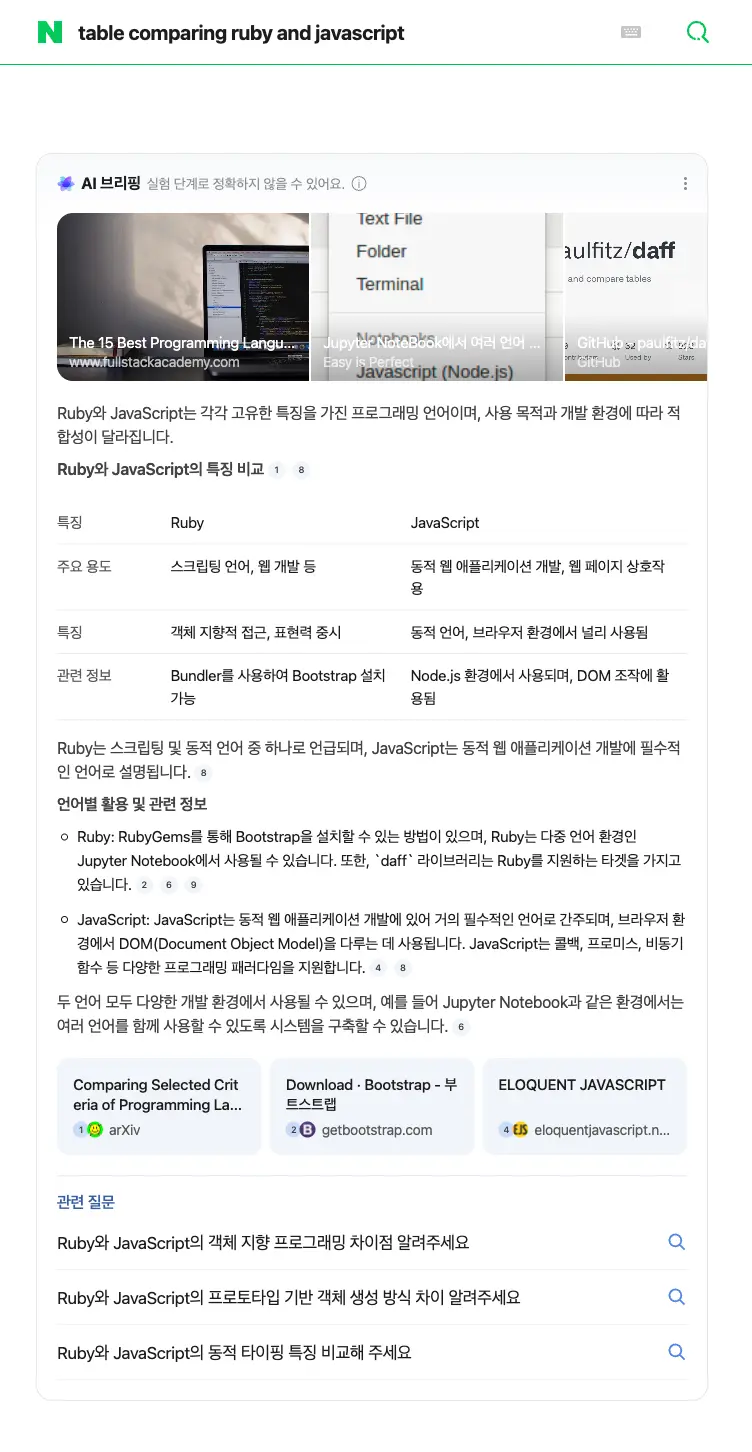
Example with table response for query: table comparing ruby and javascript
{
  ...
  "markdown": "Ruby와 JavaScript는 각각 고유한 특징을 가진 프로그래밍 언어이며, 사용 목적과 개발 환경에 따라 적합성이 달라집니다.\n\n### Ruby와 JavaScript의 특징 비교[1] [8]\n\n| 특징 | Ruby | JavaScript |\n|---|---|---|\n| 주요 용도 | 스크립팅 언어, 웹 개발 등 | 동적 웹 애플리케이션 개발, 웹 페이지 상호작용 |\n| 특징 | 객체 지향적 접근, 표현력 중시 | 동적 언어, 브라우저 환경에서 널리 사용됨 |\n| 관련 정보 | Bundler를 사용하여 Bootstrap 설치 가능 | Node.js 환경에서 사용되며, DOM 조작에 활용됨 |\n\nRuby는 스크립팅 및 동적 언어 중 하나로 언급되며, JavaScript는 동적 웹 애플리케이션 개발에 필수적인 언어로 설명됩니다.[8]\n\n### 언어별 활용 및 관련 정보\n\n*   Ruby: RubyGems를 통해 Bootstrap을 설치할 수 있는 방법이 있으며[2], Ruby는 다중 언어 환경인 Jupyter Notebook에서 사용될 수 있습니다.[6] 또한, `daff` 라이브러리는 Ruby를 지원하는 타겟을 가지고 있습니다.[9]\n*   JavaScript: JavaScript는 동적 웹 애플리케이션 개발에 있어 거의 필수적인 언어로 간주되며[8], 브라우저 환경에서 DOM(Document Object Model)을 다루는 데 사용됩니다.[4] JavaScript는 콜백, 프로미스, 비동기 함수 등 다양한 프로그래밍 패러다임을 지원합니다.[4]\n\n두 언어 모두 다양한 개발 환경에서 사용될 수 있으며, 예를 들어 Jupyter Notebook과 같은 환경에서는 여러 언어를 함께 사용할 수 있도록 시스템을 구축할 수 있습니다.[6]",
  "text_blocks": [
    {
      "type": "paragraph",
      "snippet": "Ruby와 JavaScript는 각각 고유한 특징을 가진 프로그래밍 언어이며, 사용 목적과 개발 환경에 따라 적합성이 달라집니다."
    },
    {
      "type": "header",
      "level": 3,
      "snippet": "Ruby와 JavaScript의 특징 비교",
      "reference_indexes": [
        1,
        8
      ]
    },
    {
      "type": "table",
      "table": [
        [
          "특징",
          "Ruby",
          "JavaScript"
        ],
        [
          "주요 용도",
          "스크립팅 언어, 웹 개발 등",
          "동적 웹 애플리케이션 개발, 웹 페이지 상호작용"
        ],
        [
          "특징",
          "객체 지향적 접근, 표현력 중시",
          "동적 언어, 브라우저 환경에서 널리 사용됨"
        ],
        [
          "관련 정보",
          "Bundler를 사용하여 Bootstrap 설치 가능",
          "Node.js 환경에서 사용되며, DOM 조작에 활용됨"
        ]
      ],
      "formatted": [
        {
          "특징": "주요 용도",
          "ruby": "스크립팅 언어, 웹 개발 등",
          "java_script": "동적 웹 애플리케이션 개발, 웹 페이지 상호작용"
        },
        {
          "특징": "특징",
          "ruby": "객체 지향적 접근, 표현력 중시",
          "java_script": "동적 언어, 브라우저 환경에서 널리 사용됨"
        },
        {
          "특징": "관련 정보",
          "ruby": "Bundler를 사용하여 Bootstrap 설치 가능",
          "java_script": "Node.js 환경에서 사용되며, DOM 조작에 활용됨"
        }
      ]
    },
    {
      "type": "paragraph",
      "snippet": "Ruby는 스크립팅 및 동적 언어 중 하나로 언급되며, JavaScript는 동적 웹 애플리케이션 개발에 필수적인 언어로 설명됩니다.",
      "reference_indexes": [
        8
      ]
    },
    {
      "type": "header",
      "level": 3,
      "snippet": "언어별 활용 및 관련 정보"
    },
    {
      "type": "list",
      "list_type": "unordered",
      "list": [
        {
          "snippet": "Ruby: RubyGems를 통해 Bootstrap을 설치할 수 있는 방법이 있으며, Ruby는 다중 언어 환경인 Jupyter Notebook에서 사용될 수 있습니다. 또한, `daff` 라이브러리는 Ruby를 지원하는 타겟을 가지고 있습니다.",
          "reference_indexes": [
            2,
            6,
            9
          ]
        },
        {
          "snippet": "JavaScript: JavaScript는 동적 웹 애플리케이션 개발에 있어 거의 필수적인 언어로 간주되며, 브라우저 환경에서 DOM(Document Object Model)을 다루는 데 사용됩니다. JavaScript는 콜백, 프로미스, 비동기 함수 등 다양한 프로그래밍 패러다임을 지원합니다.",
          "reference_indexes": [
            4,
            8
          ]
        }
      ]
    },
    {
      "type": "paragraph",
      "snippet": "두 언어 모두 다양한 개발 환경에서 사용될 수 있으며, 예를 들어 Jupyter Notebook과 같은 환경에서는 여러 언어를 함께 사용할 수 있도록 시스템을 구축할 수 있습니다.",
      "reference_indexes": [
        6
      ]
    }
  ],
  ...
}
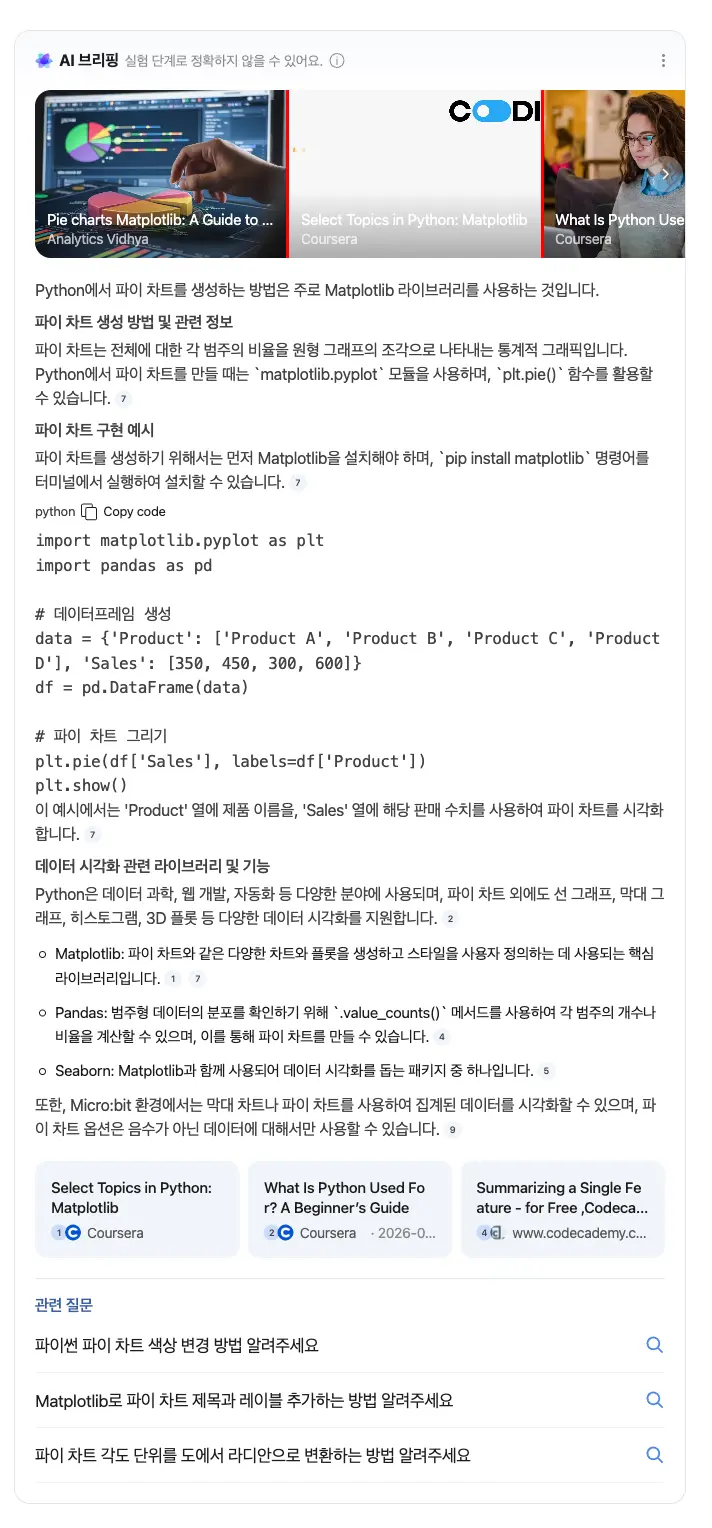
Example with code block response for query: how to code a pie chart in python
{
  ...
  "markdown": "Python에서 파이 차트를 생성하는 방법은 주로 Matplotlib 라이브러리를 사용하는 것입니다.\n\n### 파이 차트 생성 방법 및 관련 정보\n파이 차트는 전체에 대한 각 범주의 비율을 원형 그래프의 조각으로 나타내는 통계적 그래픽입니다.[7] Python에서 파이 차트를 만들 때는 `matplotlib.pyplot` 모듈을 사용하며, `plt.pie()` 함수를 활용할 수 있습니다.[7]\n\n### 파이 차트 구현 예시\n파이 차트를 생성하기 위해서는 먼저 Matplotlib을 설치해야 하며, `pip install matplotlib` 명령어를 터미널에서 실행하여 설치할 수 있습니다.[7]\n\n```python\nimport matplotlib.pyplot as plt\nimport pandas as pd\n\n# 데이터프레임 생성\ndata = {'Product': ['Product A', 'Product B', 'Product C', 'Product D'], 'Sales': [350, 450, 300, 600]}\ndf = pd.DataFrame(data)\n\n# 파이 차트 그리기\nplt.pie(df['Sales'], labels=df['Product'])\nplt.show()\n```\n이 예시에서는 'Product' 열에 제품 이름을, 'Sales' 열에 해당 판매 수치를 사용하여 파이 차트를 시각화합니다.[7]\n\n### 데이터 시각화 관련 라이브러리 및 기능\nPython은 데이터 과학, 웹 개발, 자동화 등 다양한 분야에 사용되며, 파이 차트 외에도 선 그래프, 막대 그래프, 히스토그램, 3D 플롯 등 다양한 데이터 시각화를 지원합니다.[2]\n\n*   Matplotlib: 파이 차트와 같은 다양한 차트와 플롯을 생성하고 스타일을 사용자 정의하는 데 사용되는 핵심 라이브러리입니다.[1] [7]\n*   Pandas: 범주형 데이터의 분포를 확인하기 위해 `.value_counts()` 메서드를 사용하여 각 범주의 개수나 비율을 계산할 수 있으며, 이를 통해 파이 차트를 만들 수 있습니다.[4]\n*   Seaborn: Matplotlib과 함께 사용되어 데이터 시각화를 돕는 패키지 중 하나입니다.[5]\n\n또한, Micro:bit 환경에서는 막대 차트나 파이 차트를 사용하여 집계된 데이터를 시각화할 수 있으며, 파이 차트 옵션은 음수가 아닌 데이터에 대해서만 사용할 수 있습니다.[9]",
  "text_blocks": [
    {
      "type": "paragraph",
      "snippet": "Python에서 파이 차트를 생성하는 방법은 주로 Matplotlib 라이브러리를 사용하는 것입니다."
    },
    {
      "type": "header",
      "level": 3,
      "snippet": "파이 차트 생성 방법 및 관련 정보"
    },
    {
      "type": "paragraph",
      "snippet": "파이 차트는 전체에 대한 각 범주의 비율을 원형 그래프의 조각으로 나타내는 통계적 그래픽입니다. Python에서 파이 차트를 만들 때는 `matplotlib.pyplot` 모듈을 사용하며, `plt.pie()` 함수를 활용할 수 있습니다.",
      "reference_indexes": [
        7
      ]
    },
    {
      "type": "header",
      "level": 3,
      "snippet": "파이 차트 구현 예시"
    },
    {
      "type": "paragraph",
      "snippet": "파이 차트를 생성하기 위해서는 먼저 Matplotlib을 설치해야 하며, `pip install matplotlib` 명령어를 터미널에서 실행하여 설치할 수 있습니다.",
      "reference_indexes": [
        7
      ]
    },
    {
      "type": "code",
      "language": "python",
      "code": "import matplotlib.pyplot as plt\nimport pandas as pd\n\n# 데이터프레임 생성\ndata = {'Product': ['Product A', 'Product B', 'Product C', 'Product D'], 'Sales': [350, 450, 300, 600]}\ndf = pd.DataFrame(data)\n\n# 파이 차트 그리기\nplt.pie(df['Sales'], labels=df['Product'])\nplt.show()"
    },
    {
      "type": "paragraph",
      "snippet": "이 예시에서는 'Product' 열에 제품 이름을, 'Sales' 열에 해당 판매 수치를 사용하여 파이 차트를 시각화합니다.",
      "reference_indexes": [
        7
      ]
    },
    {
      "type": "header",
      "level": 3,
      "snippet": "데이터 시각화 관련 라이브러리 및 기능"
    },
    {
      "type": "paragraph",
      "snippet": "Python은 데이터 과학, 웹 개발, 자동화 등 다양한 분야에 사용되며, 파이 차트 외에도 선 그래프, 막대 그래프, 히스토그램, 3D 플롯 등 다양한 데이터 시각화를 지원합니다.",
      "reference_indexes": [
        2
      ]
    },
    {
      "type": "list",
      "list_type": "unordered",
      "list": [
        {
          "snippet": "Matplotlib: 파이 차트와 같은 다양한 차트와 플롯을 생성하고 스타일을 사용자 정의하는 데 사용되는 핵심 라이브러리입니다.",
          "reference_indexes": [
            1,
            7
          ]
        },
        {
          "snippet": "Pandas: 범주형 데이터의 분포를 확인하기 위해 `.value_counts()` 메서드를 사용하여 각 범주의 개수나 비율을 계산할 수 있으며, 이를 통해 파이 차트를 만들 수 있습니다.",
          "reference_indexes": [
            4
          ]
        },
        {
          "snippet": "Seaborn: Matplotlib과 함께 사용되어 데이터 시각화를 돕는 패키지 중 하나입니다.",
          "reference_indexes": [
            5
          ]
        }
      ]
    },
    {
      "type": "paragraph",
      "snippet": "또한, Micro:bit 환경에서는 막대 차트나 파이 차트를 사용하여 집계된 데이터를 시각화할 수 있으며, 파이 차트 옵션은 음수가 아닌 데이터에 대해서만 사용할 수 있습니다.",
      "reference_indexes": [
        9
      ]
    }
  ],
  ...
}
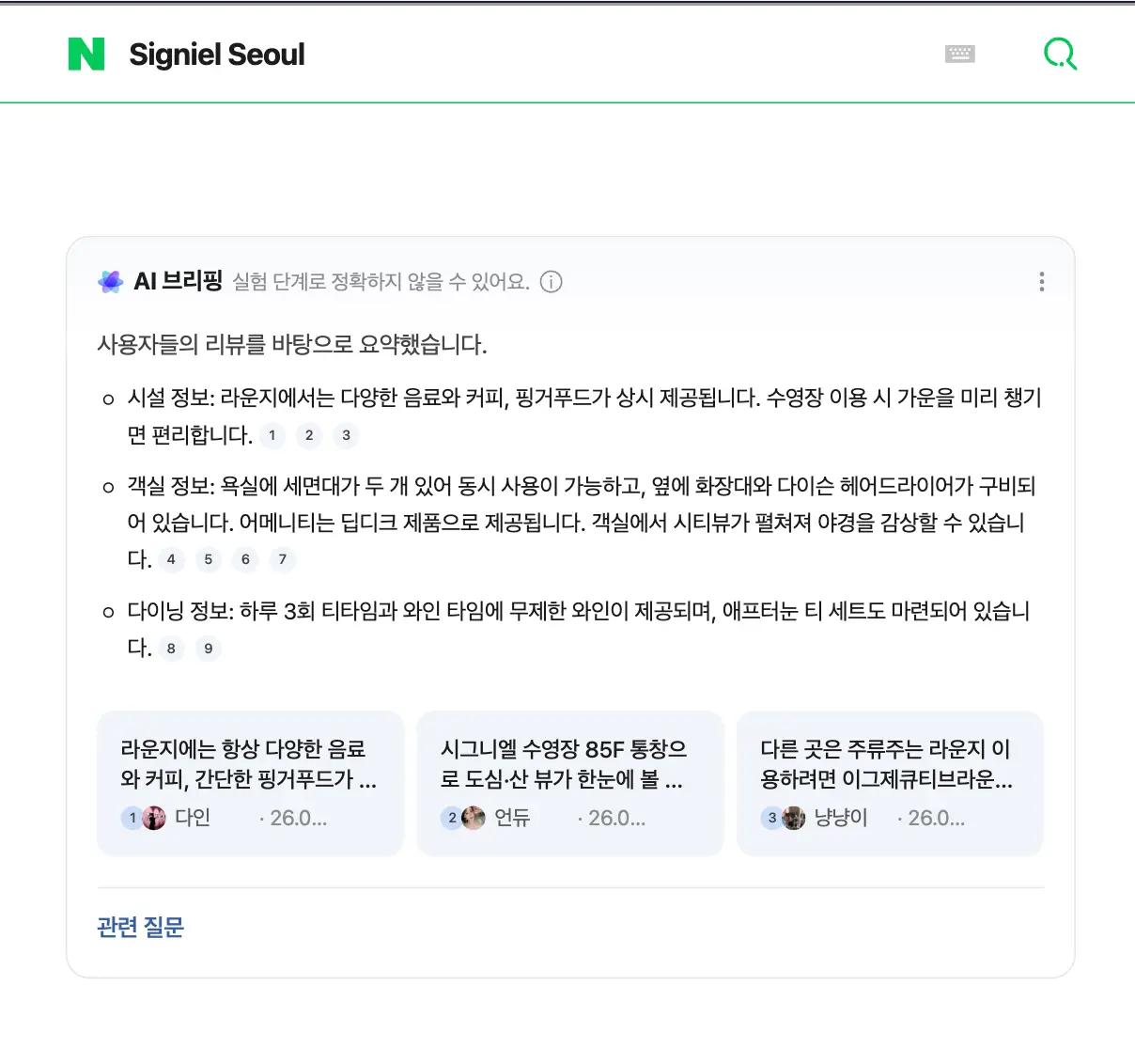
Example with Page Token for query: SIGNIEL SEOUL
{
  ...
  "markdown": "사용자들의 리뷰를 바탕으로 요약했습니다.\n- **시설 정보:** 라운지에서는 다양한 음료와 커피, 핑거푸드가 상시 제공됩니다. 수영장 이용 시 가운을 미리 챙기면 편리합니다. [1][2][3]\n- **객실 정보:** 욕실에 세면대가 두 개 있어 동시 사용이 가능하고, 옆에 화장대와 다이슨 헤어드라이어가 구비되어 있습니다. 어메니티는 딥디크 제품으로 제공됩니다. 객실에서 시티뷰가 펼쳐져 야경을 감상할 수 있습니다. [4][5][6][7]\n- **다이닝 정보:** 하루 3회 티타임과 와인 타임에 무제한 와인이 제공되며, 애프터눈 티 세트도 마련되어 있습니다. [8][9]",
  "text_blocks": [
    {
      "type": "paragraph",
      "snippet": "사용자들의 리뷰를 바탕으로 요약했습니다."
    },
    {
      "type": "list",
      "list_type": "unordered",
      "list": [
        {
          "snippet": "시설 정보: 라운지에서는 다양한 음료와 커피, 핑거푸드가 상시 제공됩니다. 수영장 이용 시 가운을 미리 챙기면 편리합니다.",
          "snippet_highlighted_words": [
            "시설 정보:"
          ],
          "reference_indexes": [
            1,
            2,
            3
          ]
        },
        {
          "snippet": "객실 정보: 욕실에 세면대가 두 개 있어 동시 사용이 가능하고, 옆에 화장대와 다이슨 헤어드라이어가 구비되어 있습니다. 어메니티는 딥디크 제품으로 제공됩니다. 객실에서 시티뷰가 펼쳐져 야경을 감상할 수 있습니다.",
          "snippet_highlighted_words": [
            "객실 정보:"
          ],
          "reference_indexes": [
            4,
            5,
            6,
            7
          ]
        },
        {
          "snippet": "다이닝 정보: 하루 3회 티타임과 와인 타임에 무제한 와인이 제공되며, 애프터눈 티 세트도 마련되어 있습니다.",
          "snippet_highlighted_words": [
            "다이닝 정보:"
          ],
          "reference_indexes": [
            8,
            9
          ]
        }
      ]
    }
  ],
  "references": [
    {
      "index": 1,
      "snippet": "라운지에는 항상 다양한 음료와 커피, 간단한 핑거푸드가 마련되어 있고요. 하루 3번 티타임/와인 타임에는 좀 더 풍성하게 준비됩니다. 특히 하이라이트는 노을 지는 저녁 2시간의 무제한 와인 타임",
      "link": "https://blog.naver.com/art-dine/224327492629",
      "source": "다인",
      "source_icon": "https://blogpfthumb-phinf.pstatic.net/MjAyMzA4MTdfMjg1/MDAxNjkyMjUzMjIxMzU3.jgkHBliVsaIlQSuix-8ZaEmuCNEIYcIgBH1Y5NOxJQog.SMA-rRL4GsHo2GuHlnf3pBbotYhLomcVXlXWKpEJzjQg.JPEG.lalee0313/profileImage.jpg",
      "date": "26.06.25."
    },
    {
      "index": 2,
      "snippet": "시그니엘 수영장 85F 통창으로 도심·산 뷰가 한눈에 볼 수 있고 레인이 있는 라운지풀이라 가볍게 수영하기에도 좋았어요 수심은 163 성인 여자 기준 가슴까지 오는 정도여서 마냥 낮지는 않더라고요!",
      "link": "https://blog.naver.com/ribbon1209/224328758006",
      "source": "언듀",
      "source_icon": "https://blogpfthumb-phinf.pstatic.net/MjAyNTAyMDFfMTg5/MDAxNzM4NDExMTc4MzUy.WLCuFTgWqZWkobMhgFBfHeFWkhnUB9vn4DLLwanohBYg.rtQRpECZZpDwFT28XEkWx_73PAJVVQAGJi6FDpSUaHkg.PNG/profileImage.png",
      "date": "26.06.27."
    },
    {
      "index": 3,
      "snippet": "다른 곳은 주류주는 라운지 이용하려면 이그제큐티브라운지 포함으로 결제를 해야하는데 룸안에 포함이라 굿이실게요.",
      "link": "https://blog.naver.com/1225_79/224315796872",
      "source": "냥냥이",
      "source_icon": "https://blogpfthumb-phinf.pstatic.net/MjAyNTAzMjNfMTY3/MDAxNzQyNzA1NDE0MTg5.oSouXbBpriArFJESslsyjcK5qZlCpt_A1fPqSRM9POkg.ljF_kaHWh18crDBdx5hUApYokkw4Hl01TlO8hDwMoPgg.JPEG/profileImage.jpg",
      "date": "26.06.14."
    },
    {
      "index": 4,
      "snippet": "욕실은 들어가기도 전에 뷰가 기대됐고요 멀리서부터 딥디크인 어메니티 취저에요 세면대도 두개라서 각자 같이 양치하기 좋고 왼편으로는 작은 화장대같은 공간이 있어서 편하게 화장하고 머리말리기 좋았어요",
      "link": "https://blog.naver.com/pearl2727_/224330883250",
      "source": "쥬쥬",
      "source_icon": "https://blogpfthumb-phinf.pstatic.net/MjAyNTA4MjlfODkg/MDAxNzU2NDM5NTMzMDUx.tJJLQJ3QbN1diB5dAyaaMYpaw-VgfYNp0Pk3lckVVk0g.PKRJe6_CilYlaA723ID43uZ7N3NqbDSvoCDYJpZs0Psg.PNG/profileImage.png",
      "date": "26.06.29."
    },
    {
      "index": 5,
      "snippet": "욕실 세면대가 두개라서 편했고요! 사진엔 안 나오지만, 세면대 맞은편에 화장대가 있어요 다이슨 헤어드라이어도 마련되어 있습니다",
      "link": "https://blog.naver.com/moondiary_/224326753096",
      "source": "봄찬",
      "source_icon": "https://blogpfthumb-phinf.pstatic.net/MjAyNDA4MTZfNDMg/MDAxNzIzNzQzNzkzMTA4.letCUO_ocYb3DtqyGac19IiB_3JzP3qf_UT1l14vlrYg.nxjxG49s3QW1Z6RTT1etBclipyPl9hWpDvWlBYBXvssg.JPEG/profileImage.jpg",
      "date": "26.06.25."
    },
    {
      "index": 6,
      "snippet": "어메니티 구성은 딥디크 제품으로 준비되어있고, 향은 무난했구요 욕실 고급미 뿜뿜 -",
      "link": "https://blog.naver.com/yoonny_tami/224325940122",
      "source": "템미",
      "source_icon": "https://blogpfthumb-phinf.pstatic.net/MjAyNTA0MjNfMTc2/MDAxNzQ1Mzg2NTg2MDM3.Z0iIdo1MWr0ImCRG1buIa0ONCEye1GBtBJCuZLoeUUYg.20lSj2XlY0ww-iLXlitW0KcN5ki8fS8KMVNw0MZq2j4g.PNG/profileImage.png",
      "date": "26.06.24."
    },
    {
      "index": 7,
      "snippet": "어메니티는 딥티크 제품이 준비되어 있었는데 향도 고급스럽고 사용감도 만족스러웠습니다.",
      "link": "https://blog.naver.com/8jzopmqkq/224328350303",
      "source": "90년생대표변호사",
      "source_icon": "https://blogpfthumb-phinf.pstatic.net/MjAyNTA4MTBfMjAy/MDAxNzU0ODA0ODE5OTEw.3CXwg9pHI_yMGvi8ScH3IKNNR5nPnH83cXkFc0cClMwg.G0quLKRbUJdksLYAB3GDUSjhNQGM0L4clyEZyBrV3cIg.PNG/1742197236.png/1742197236.png",
      "date": "26.06.26."
    },
    {
      "index": 8,
      "snippet": "시그니엘 서울 라운지 애프터눈티 메뉴",
      "link": "https://blog.naver.com/jenny_good/224311723596",
      "source": "달콤한제니",
      "source_icon": "https://blogpfthumb-phinf.pstatic.net/MjAxODEwMTZfMzQg/MDAxNTM5NjkwMjA0MjU0.NSr1LC2tNqQjRmmdOgECX9OH-0kNIYEKRzXB1aGsXqgg.rk70NJeryIoP0p0DLO9wToMnMpqKmoI7dvYcgsfDbRUg.JPEG.jenny_good/profileImage.jpg",
      "date": "26.06.10."
    },
    {
      "index": 9,
      "snippet": "호텔 결혼식 중에서 가장 만족스러웠던 파인다이닝 코스 는 미슐랭 3스타 셰프의 디렉팅으로 완성된 코스요리에요!",
      "link": "https://blog.naver.com/zoeful-/224314114553",
      "source": "조이한 세상",
      "source_icon": "https://blogpfthumb-phinf.pstatic.net/MjAyNjA0MDlfMzYg/MDAxNzc1NzEyMTQ2NTY1.24by_-VT_hYGPGH96rTLCQO8bPC90xtFkumch_ji6Hcg.yqAXu4-LSxq6gPZyI554L5Zx3z1eMvqoj7Xt0y8Rffkg.PNG/Gemini_Generated_Image_srn52psrn52psrn5.png/Gemini_Generated_Image_srn52psrn52psrn5.png",
      "date": "26.06.12."
    }
  ]
}
JSON structure overview
{
  ...
  "markdown": "String - Markdown formatted text representing the main content",
  "text_blocks": [
    {
      "type": "String - Type of the text block. Can be 'header', 'paragraph', 'list', 'table', 'code'",
      "snippet": "String - Snippet of the text block",
      "snippet_highlighted_words": "Array of Strings - Highlighted words in the snippet",
      "reference_indexes": "Array of Integers - Indexes of references related to this text block",
      // Only for 'header' type
      "level": "Integer - Level of the header (1-6)",
      // Only for 'list' type
      "list_type": "String - Type of the list. Can be 'ordered' or 'unordered'",
      "list": [
        {
          "position": "Integer - Position of the list item (only for ordered lists)",
          "snippet": "String - Snippet of the list item",
          "snippet_highlighted_words": "Array of Strings - Highlighted words in the snippet",
          "reference_indexes": "Array of Integers - Indexes of references related to this list item"
        }
      ],
      // Only for 'table' type
      "table": [
        [
          "String - Table header cell",
          ...
        ],
        [
          "String - Table row cell",
          ...
        ],
        ...
      ],
      "formatted": [
        {
          "header_cell_snake_case": "String - Value from the corresponding column for this row"
        },
        ...
      ],
      // Only for 'code' type
      "language": "String - Programming language of the code block",
      "code": "String - Code snippet"
    }
  ],
  "references": [
    {
      "index": "Integer - Index of the reference",
      "title": "String - Title of the reference",
      "snippet": "String - Snippet of the reference",
      "link": "String - URL of the reference",
      "source": "String - Source name of the reference",
      "source_icon": "String - URL of the source icon",
      "date": "String - Date of the reference (if available)"
    },
    ...
  ],
  "media": [
    {
      "position": "Integer - Position of the media in the list",
      "type": "String - Type of the media. Can be 'image' or 'longform'",
      "title": "String - Title of the media",
      "name": "String - Name of the source or author",
      "link": "String - URL of the media",
      "thumbnail": "String - URL of the media thumbnail",
      "platform": "String - Platform name of the media"
    },
    ...
  ],
  "related_questions": [
    {
      "question": "String - Related question",
      "serpapi_link": "String - SerpApi link for the related question"
    },
    ...
  ],
  ...
}